


Run your marketing from the cmo.so app
Everything Maggie does for you, in one place: drafts to approve, posts going out, channels to connect and the results, for every website you run. On the web at app.cmo.so, and on iPhone in beta through TestFlight.
Free to start · Web at app.cmo.so · iPhone beta on TestFlight
Used by 600+ users and trusted by teams at
aeglesriphal.com
moonlakespa.com
shop.theteagroup.com
clo100.com
logtrics.io
mymorez.com
nextidal.com
otisapp.com
storaitelling.com
theheatpumps.co.uk
web-translations.com
exposeai.tech
orielipo.com
whitelabelcrowd.fund
elliptic.co
med.moonlakespa.com
netdex.co.il
orawellness.uk
reenest.com
syngage.ai
thepenthouseliving.com
zengolf.studio
imaintain.uk
rebuildingsociety.com
aurasocial.world
goaimex.com
moneyparents.com
newgenrenewables.uk
osmosisai.co
saunders.ac
teeza.app
thursdayclub.com
On the web, or on your iPhone
Same screens, same websites and the same approvals in both. Start on one and finish on the other.
Your marketing team, in your pocket
Home: what needs you
Your inbox at the top, then posts this month, website health and how your site does in Google and in AI answers.
Posts: your blog
Articles waiting in Ready, what is coming up, your ideas, and the form to connect your website.
Social: every channel
Posts waiting in Review for each channel. Approve in a tap, ask Maggie to change one, or approve all.
Maggie: ask in plain words
The Maggie tab sits in the middle. Ask what needs you, ask for a plan, or ask her to fix a post.
One idea, every channel
Write one line and Maggie turns it into a post for each channel, in that channel's style, with pictures in your look.
Me: your business and team
Your business profile, Maggie Memory, reports, notifications and the team who can see or change each website.
A tour of the app, top to bottom
Five tabs: Home, Posts, Maggie in the middle, Social and Me. Here is what each one is for, on a real account.
Start on Home
Home is your inbox. What needs you comes first, then posts this month and today, your website health scores and how your site does in Google and in AI answers. The number next to Inbox is how much is waiting.
Tip On iPhone, join the beta on TestFlight and you get the same Home in your pocket.
Join on TestFlight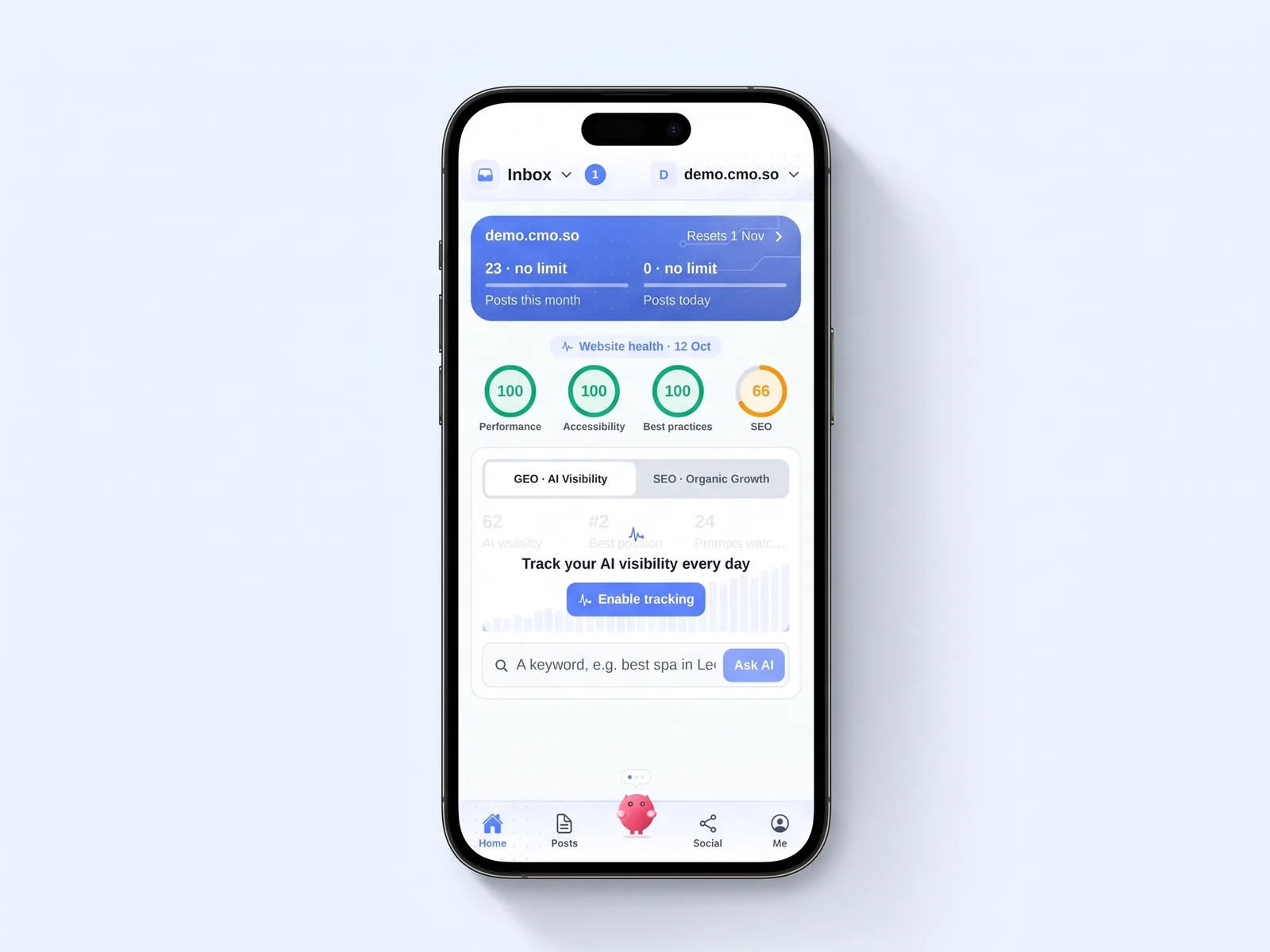
Connect your social channels in Social
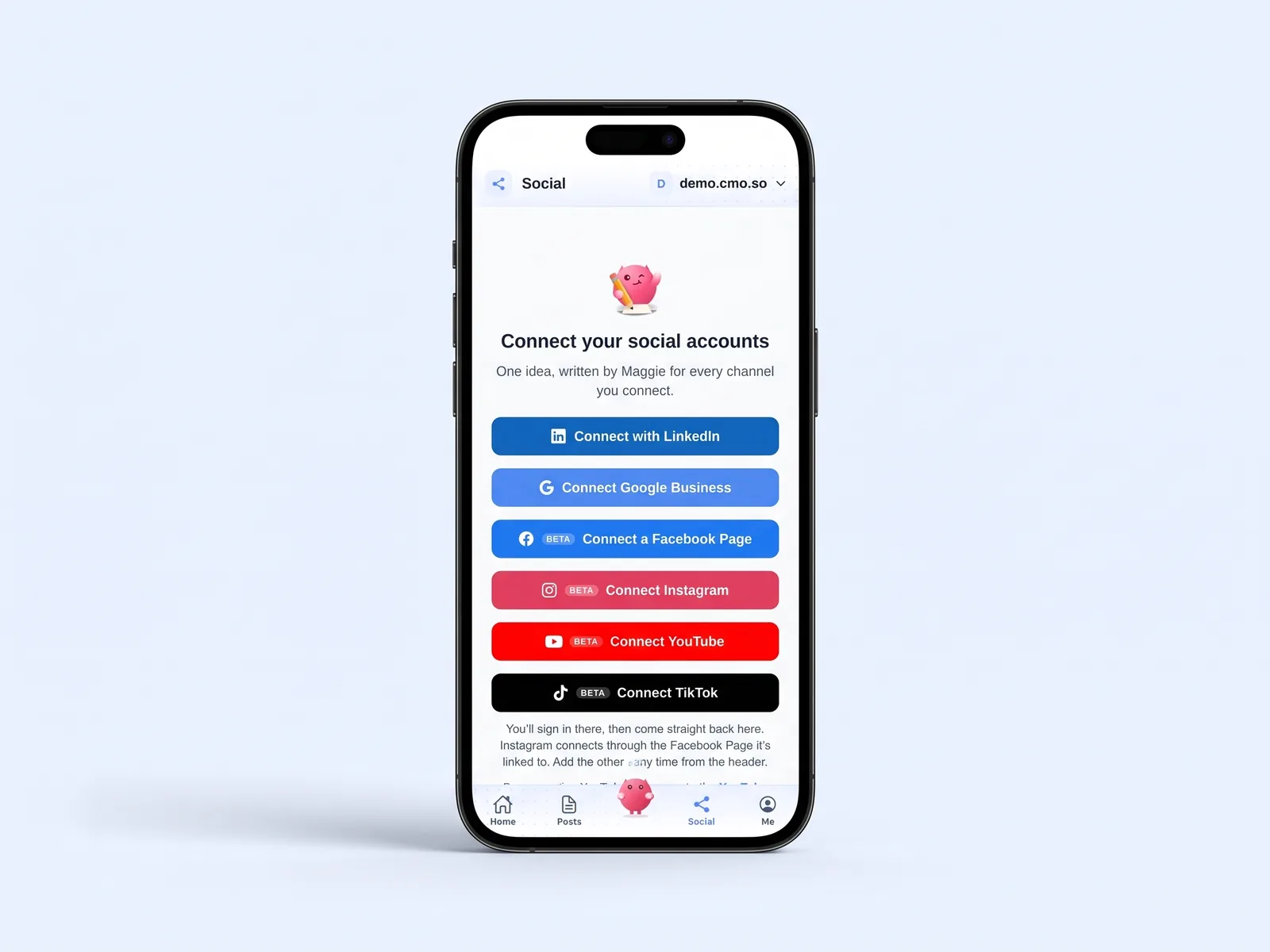
Tap Connect with LinkedIn or Connect Google Business, or a beta channel such as Facebook, Instagram, YouTube or TikTok. You sign in on the platform itself, so cmo.so never sees your password, and come straight back to the app.
Check your articles in Posts
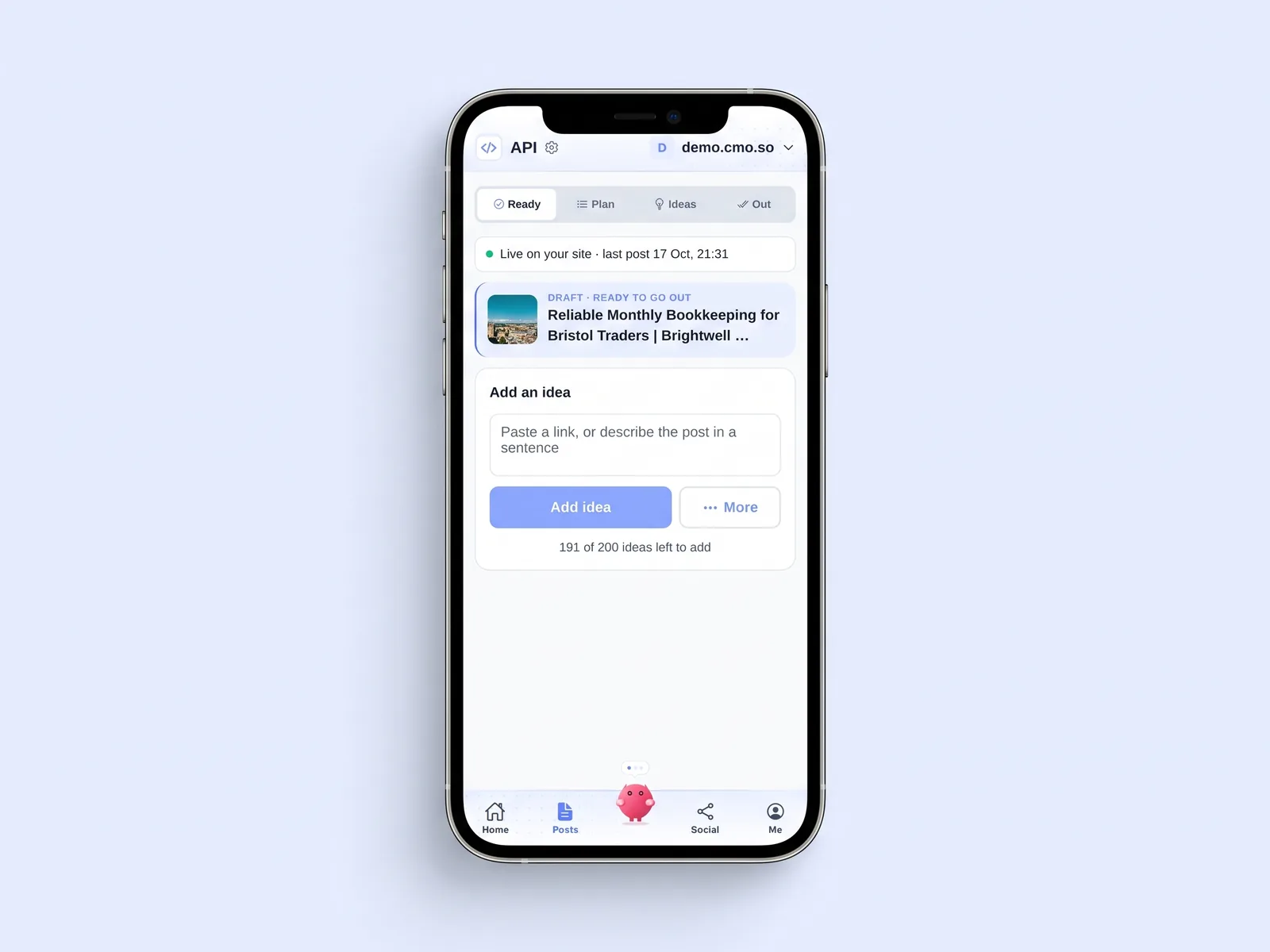
Posts has four views: Ready, Plan, Ideas and Out. Ready shows articles waiting to go out to your website. To add your own topic, paste a link or describe the post in a sentence and tap Add idea.
Ask Maggie in the middle
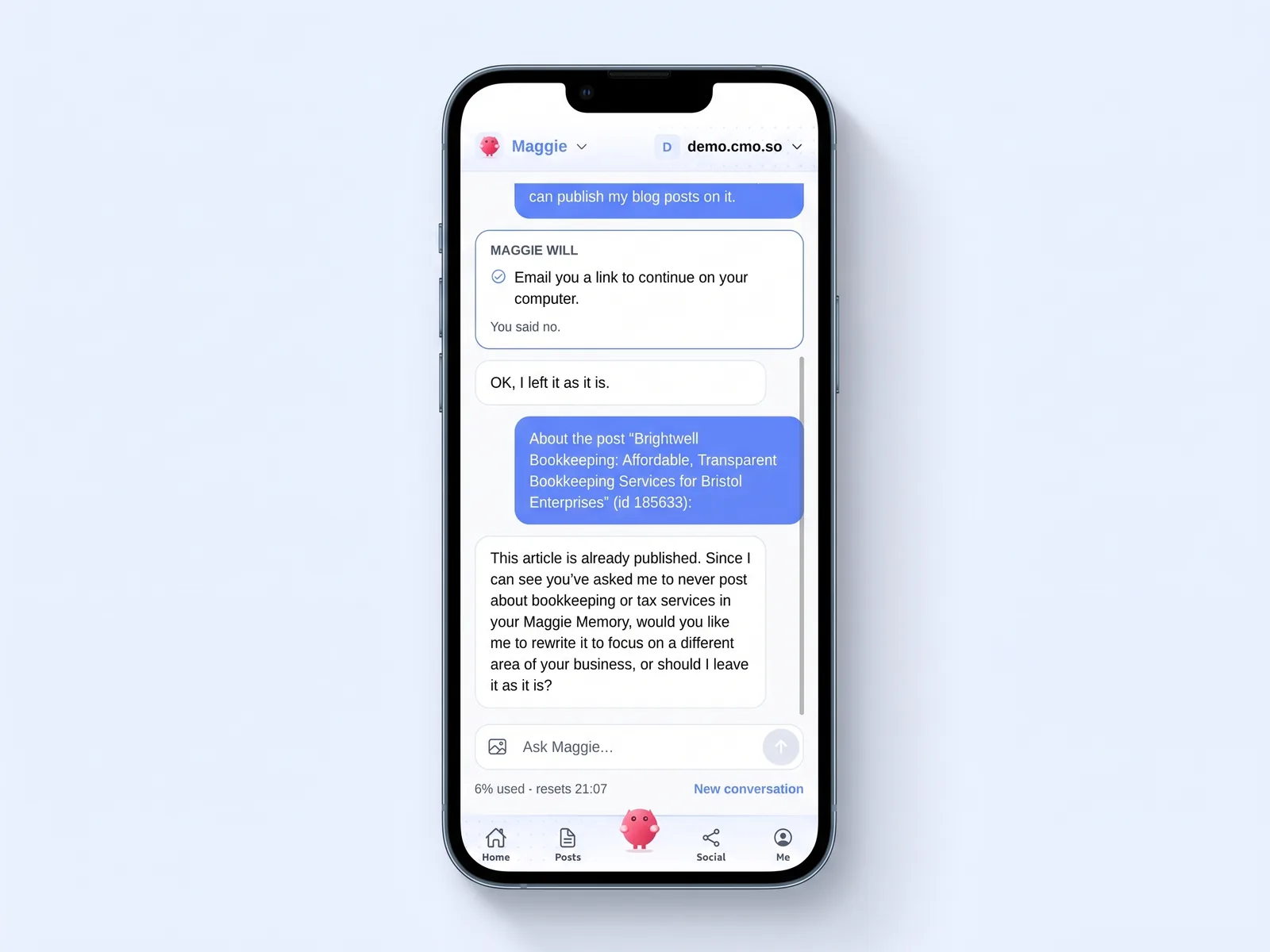
Tap the pink Maggie in the middle of the bar and ask in your own words, from what needs you today to a rewrite of one post. When she wants to change something she shows it first, and nothing happens until you say yes.
Run every website from Me
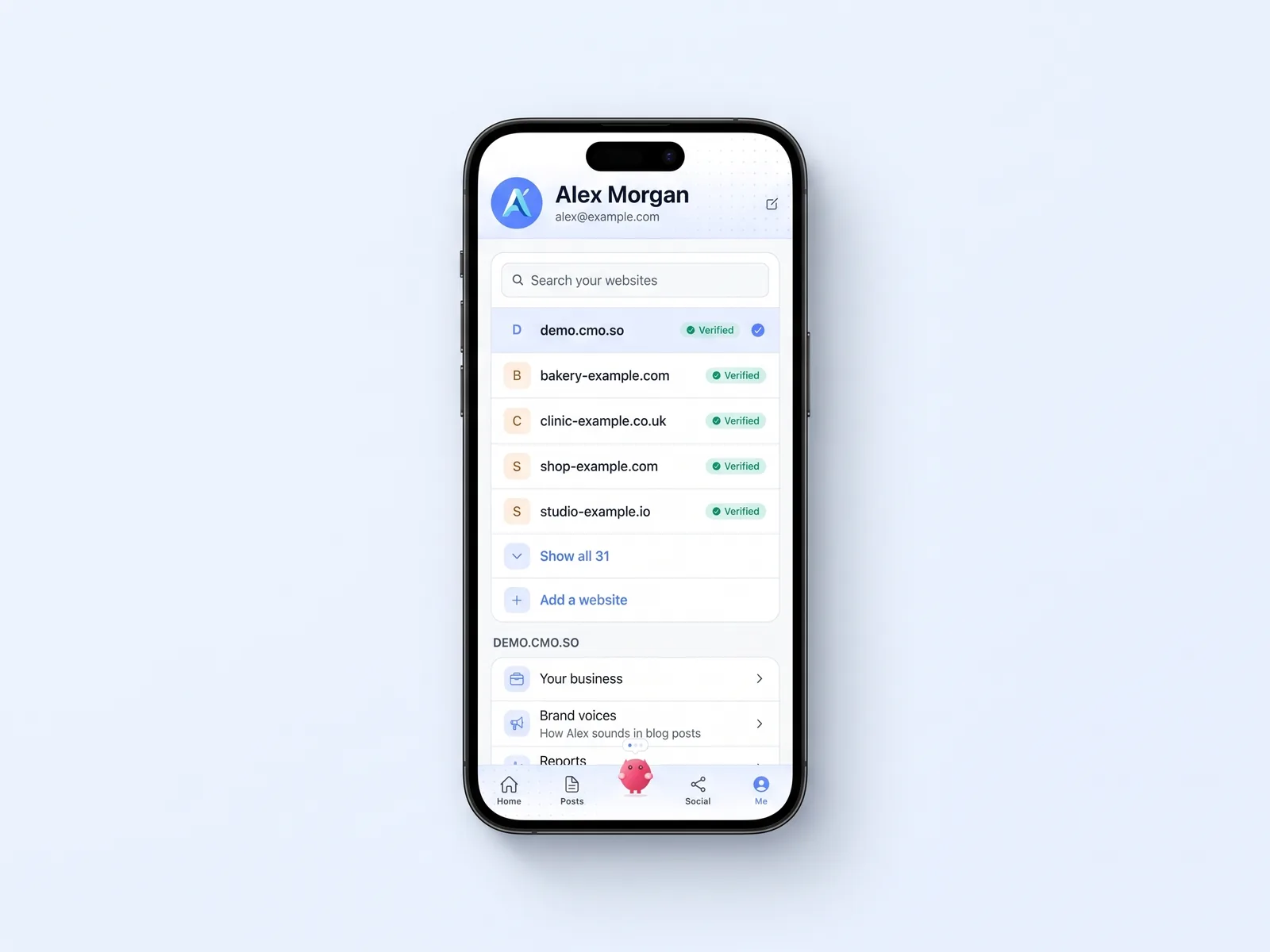
Me lists your websites: search, switch between them or add a new one. Below the list are your business profile, brand voices, reports, notifications and the team who can see or change each website.

A morning with the cmo.so app
You open the app before work. Home says three LinkedIn posts and one article are waiting, and nothing has failed.
You swipe through Review, ask Maggie to make one post shorter, and approve the rest. The article looks good, so you approve it too.
At lunch you check Reports. Search shows which articles Google is starting to show, and AI answers shows the questions where you were mentioned. Then you close the app and get on with your day.
The cmo.so app at a glance
- Where
- app.cmo.so in any browser; iPhone app in beta
- Tabs
- Home, Posts, Maggie, Social and Me
- Websites
- Every website you run, one at a time; switch at the top
- Connect your website
- WordPress (plugin or application password), Shopify, Wix, any site by API, or Vibe Coding
- Social channels
- LinkedIn and Google Business; Facebook, Instagram, YouTube and TikTok in beta
- Verify your website
- By a work email on your domain, by DNS (one tap with Cloudflare), or ask us
- Reports
- Overview, Search, Articles, AI answers and Site health
- Price
- Free to start; paid plans from £15 a month per website
Things to know about the app
iPhone is in beta
The iPhone app is still in beta. The web app at app.cmo.so has the same screens and works in any browser.
Beta channels need a request
Facebook, Instagram, YouTube and TikTok are in beta. Tap one and ask to join; we add you and email you.
Some settings stay on the web
Billing, your password, Google Ads, agency settings and Webflow are still on the ai.cmo.so dashboard.
One publishing connection
Each website publishes through one connection. Choosing a new one turns the old one off, so nothing goes out twice.
Cut the £5,900/mo marketing bill to £15/mo
Everything a marketing team does, done by Maggie.
| What needs doing | Without cmo.so | With cmo.so |
|---|---|---|
| Full-time marketing hire | £3,000/mo | Included |
| SEO and AI search (GEO) agency | £1,000/mo | Included |
| Content writer, AI-assisted | £500/mo | Included |
| Social media manager, freelance | £800/mo | Included |
| Designed pictures for every post | £300/mo | Included |
| SEO and GEO softwareRank tracking, site audits, AI visibility | £250/mo | Included |
| AI writing and image tools | £50/mo | Included |
| Working hours | Office hours | 24/7 |
| Total per month | £5,900+ | From £15/mo |
Typical UK costs for a small business in 2026, with AI already cutting freelance rates. Estimates only; your own quotes will vary.
- 5 social posts, 30 once verified
- 15 Maggie messages a day
- Upgrade any time
- 12 posts a day
- 150 Maggie messages a day
- All channels
- 96 posts a day
- 1,000 Maggie messages a day
- All channels
Per website, billed monthly. Blog and social posts share one allowance; your best plan sets how much you can talk to Maggie across all your websites.
The cmo.so app: your questions
Still unsure?
Where can I use the cmo.so app?
On the web at app.cmo.so, in any browser on a computer, tablet or phone, and on iPhone, where the app is in beta. Both show the same screens and the same data, so you can start on one and finish on the other.
The dashboard at ai.cmo.so is still there for a few settings, such as billing, your password and agency options, but day-to-day work like approving posts, connecting channels and reading results happens in the app.
Is the iPhone app ready to use?
The iPhone app is in beta on Apple's TestFlight. You can review and approve posts with it, but we are still adding to it and polishing it, so expect changes from one version to the next.
To join, install the free TestFlight app from the App Store, then open https://testflight.apple.com/join/6EwuvYy6 on your iPhone, tap Accept and Install, and sign in with your cmo.so account. TestFlight tells you when a new version is ready.
If you would rather not use a beta, open app.cmo.so in Safari instead. It has the same tabs and the same approvals, and everything you do there shows up on your phone too.
What do the five tabs do?
Home shows what needs you, with your inbox at the top, then your posts this month, website health and performance. Posts is your blog: articles ready to approve, what is coming up, your ideas and the connect form. Social holds every channel and its posts waiting in Review.
Maggie, in the middle, is where you ask her anything, from what needs you today to a rewrite of one post. Me holds your business profile, Maggie Memory, reports, notifications, your team and your account.
How do I approve posts in the app?
New social posts wait under Social, in Review. Swipe right or tap Approve, change one with Ask Maggie to change it, or approve them all at once. Articles for your website wait under Posts, in Ready.
Some posts, such as YouTube and TikTok videos, are always approved one by one. Nothing goes out until you approve it, unless you let a channel post on its own.
Can I connect my website from the app?
Yes. Go to Posts and open Connect your site. Choose WordPress (the plugin or an application password), Shopify, Wix, Any site or Vibe Coding, and the app shows what to prepare and where to type it.
Every form checks your details with the platform first and saves nothing if that fails. Your keys go straight to cmo.so in the form; Maggie never sees them. Webflow is still set up from the dashboard with our team.
How do I verify my website?
The app offers a few ways. Use a work email on the same domain as your website and type in the code we send, add a DNS record yourself, or let Cloudflare add it in one tap if your domain is there. WordPress sites can verify through the plugin, and you can also ask us.
You can use the app before verifying, including five free social posts per account, so you can see what Maggie writes first. Verifying unlocks blog publishing and your plan's full posting on every channel.
Which social channels can I run from the app?
LinkedIn and Google Business are open to everyone. Facebook Pages, Instagram, YouTube and TikTok are in beta: tap one in the app, ask to join the beta, and we add you and send you an email when you are in.
Each channel connects through the platform's own sign-in, so cmo.so never sees your password. Each has its own posting times and its own queue, and you can pause one without touching the others.
Can I run more than one website?
Yes. The app lists every website you run and you switch between them at the top. Each one keeps its own brand profile, channels, posting times, plan and conversation with Maggie.
Agencies use this to run many brands from one account. Plans are per website, so each client gets their own allowance, and you can add the client or your own staff to just the websites they work on.
Can my team use the app too?
Yes. Under Me, Team, you can add people to a website and choose what each can see or change, from looking only to editing posts and the business profile. Each person signs in with their own account.
Some things stay personal even on a shared website: each person's LinkedIn and brand voices, and their Maggie Memory, are their own. Teammates cannot see them, and Maggie will not show them to anyone else.
Does the app send notifications?
Yes. Turn them on under Me, Notifications. The app tells you when posts are waiting for your review, when a post fails and when an article goes live, grouped so one website does not flood you.
Tapping a notification opens the right website, so you land straight on the posts that need you. If you use the web app on an iPhone, add it to your Home Screen first so notifications can reach you.
Where do I see results in the app?
Home shows the headline numbers: posts this month, website health, AI visibility and, once Search Console is connected, clicks from Google. Me, Reports goes deeper, with tabs for Overview, Search, Articles, AI answers and Site health.
Articles marks each article as doing well, starting to show or with no visitors yet, which helps Maggie choose what to rewrite. You can also ask Maggie to explain any of it.
Is the app free?
The app itself is free, and so is signing up, with no card needed. The free plan includes 5 social posts, then 30 once your website is verified, and 15 Maggie messages a day.
Paid plans start at £15 a month per website for 2 posts a day and go up to Elite at 96 a day. Plans are monthly and you can cancel any time; everything already published stays on your website and channels.
The rest of the toolkit
The app works hand in hand with Ask Maggie and AI visibility, on the same account.


Open the app and meet Maggie
Sign up free, with no card. Maggie builds your brand profile and first ideas in minutes.
- Free plan, no card needed
- You approve every post
- Cancel any time