


Ask Maggie, the chat that runs your marketing
Ask what needs you today, how your articles are doing or what to write next. Maggie reads your real data, answers in plain words and shows every change before she makes it. In the app, ChatGPT, Claude and your code editor.
Free plan: 15 messages a day · No card needed
Used by 600+ users and trusted by teams at
aeglesriphal.com
moonlakespa.com
shop.theteagroup.com
clo100.com
logtrics.io
mymorez.com
nextidal.com
otisapp.com
storaitelling.com
theheatpumps.co.uk
web-translations.com
exposeai.tech
orielipo.com
whitelabelcrowd.fund
elliptic.co
med.moonlakespa.com
netdex.co.il
orawellness.uk
reenest.com
syngage.ai
thepenthouseliving.com
zengolf.studio
imaintain.uk
rebuildingsociety.com
aurasocial.world
goaimex.com
moneyparents.com
newgenrenewables.uk
osmosisai.co
saunders.ac
teeza.app
thursdayclub.com
On the web, or on your iPhone
Ask Maggie lives in the middle of the cmo.so app. Open it on the web, or get the iPhone beta on TestFlight.
A marketer you can just ask
The nine things people ask most. Copy one, paste it into the Maggie tab, ChatGPT or Claude, and change the words to fit.
“What needs me today?”
Maggie checks your inbox: drafts waiting, anything that failed and the next setup step, then goes through them with you.
“How did my articles do last month?”
She reads Search Console for your site and tells you which articles people found, the searches behind them and what to write next.
“How do I show up in AI answers?”
She reads your AI visibility: your score, the questions you watch and the pages AI cites, then suggests where to improve.
“Plan 4 blog posts for next month”
She suggests ideas from your brand profile, sitemap and links, and adds the ones you pick to your plan after you say yes.
“Write a LinkedIn post about our new service”
She drafts it in your voice, in LinkedIn's style, and shows it to you before it joins your queue.
“Make this post shorter and friendlier”
Point at a draft and say what to change. She rewrites it and shows the new version before saving it.
“Never use emojis on LinkedIn”
Maggie Memory keeps it for that website and channel, so every draft follows it from now on.
“Add our new product to the business profile”
She updates your brand profile, which every post starts from, after you check the change.
“Pause LinkedIn posts for now”
She pauses posting on that channel, so nothing goes out there until you resume. Your drafts stay where they are.
One Maggie, wherever you work
The same memory and the same approvals everywhere. A change you approve in one place is already there in the others.
In the cmo.so app
The Maggie tab, on the web at app.cmo.so and on iPhone in beta. One conversation per website, with suggested questions to start.
In the ai.cmo.so dashboard
Ask Maggie inside the brand editor to add products, testimonials, audiences, calls to action or a brand voice.
In ChatGPT and Claude
Connect cmo.so to your AI assistant and ask Maggie there. She shows each change before she makes it.
In Cursor, VS Code and the terminal
The cmo.so MCP server and CLI, with the same approvals, for people who work in a code editor.
From a question to a change you agreed to
A real conversation in the cmo.so app, step by step.
Ask in your own words
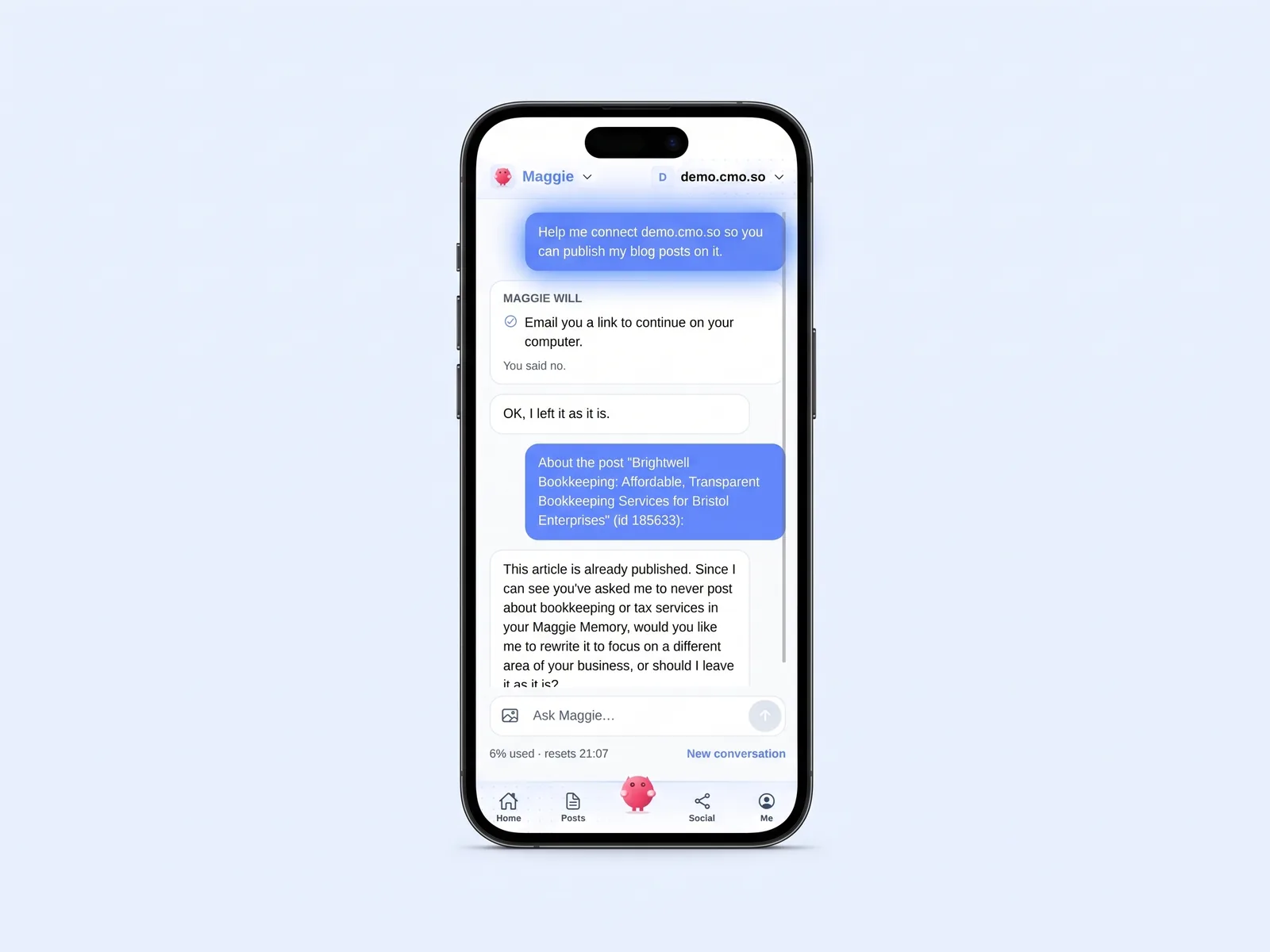
Type in the Maggie tab, in ChatGPT or Claude, or use your keyboard's dictation. No commands to learn: here someone asked for help connecting their website.
Maggie looks it up
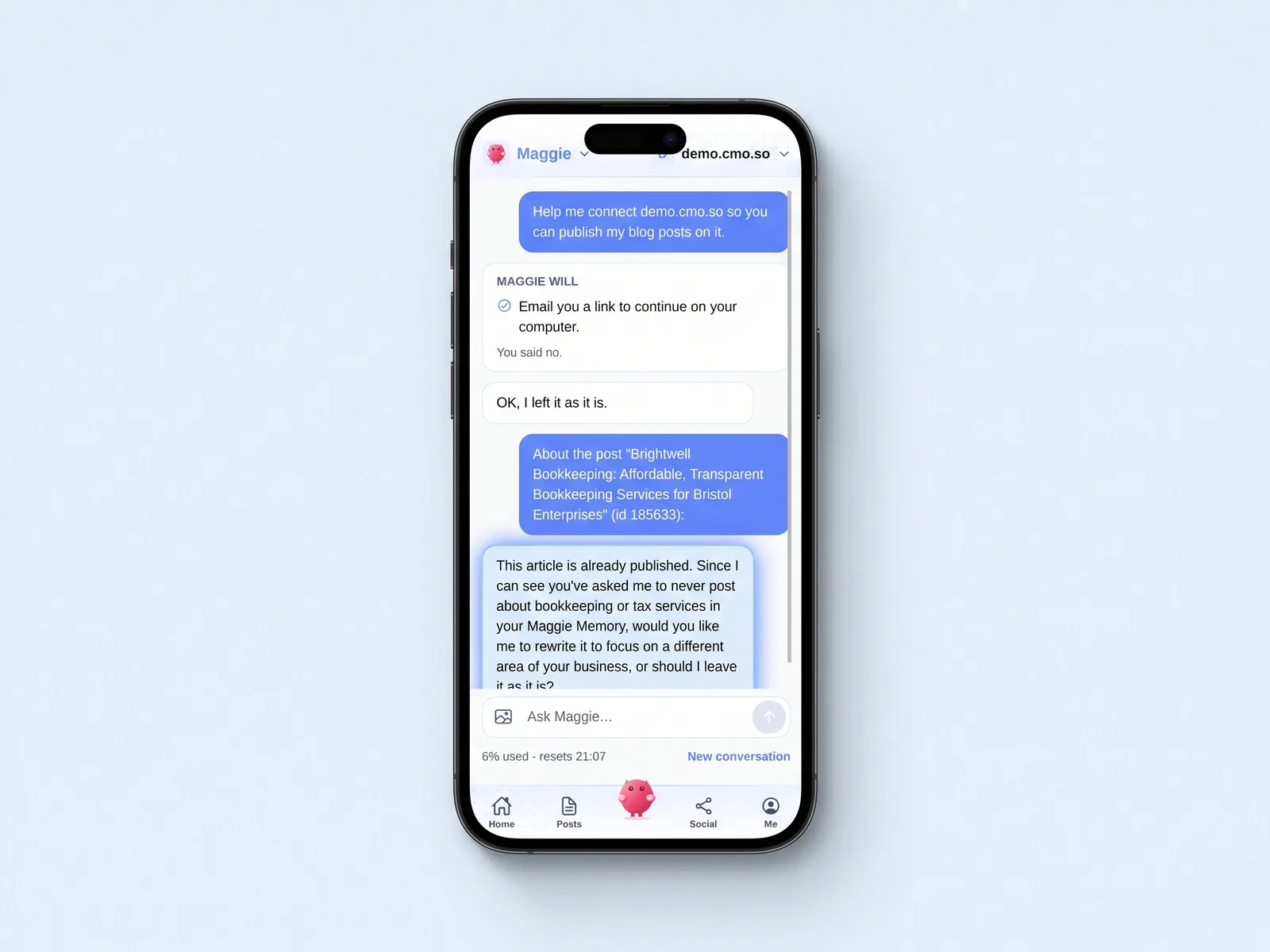
Reads happen straight away and change nothing. She checks your posts, settings and Maggie Memory before she answers, as she did here before replying about a published article.
She shows the change first
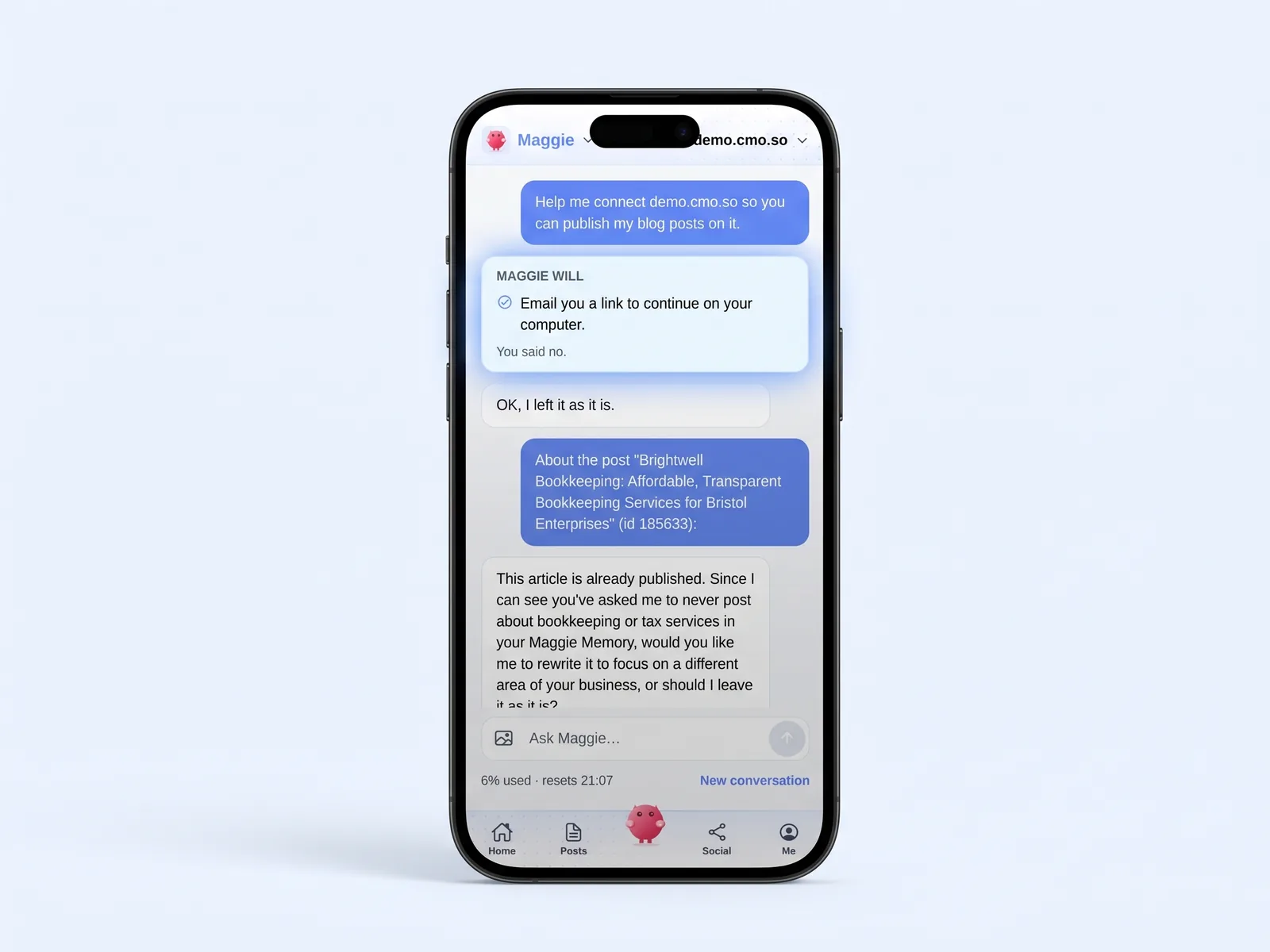
Before any change, a card that starts with Maggie will says exactly what will happen. If it uses a credit or an AI generation, the card says so.
You say yes or no
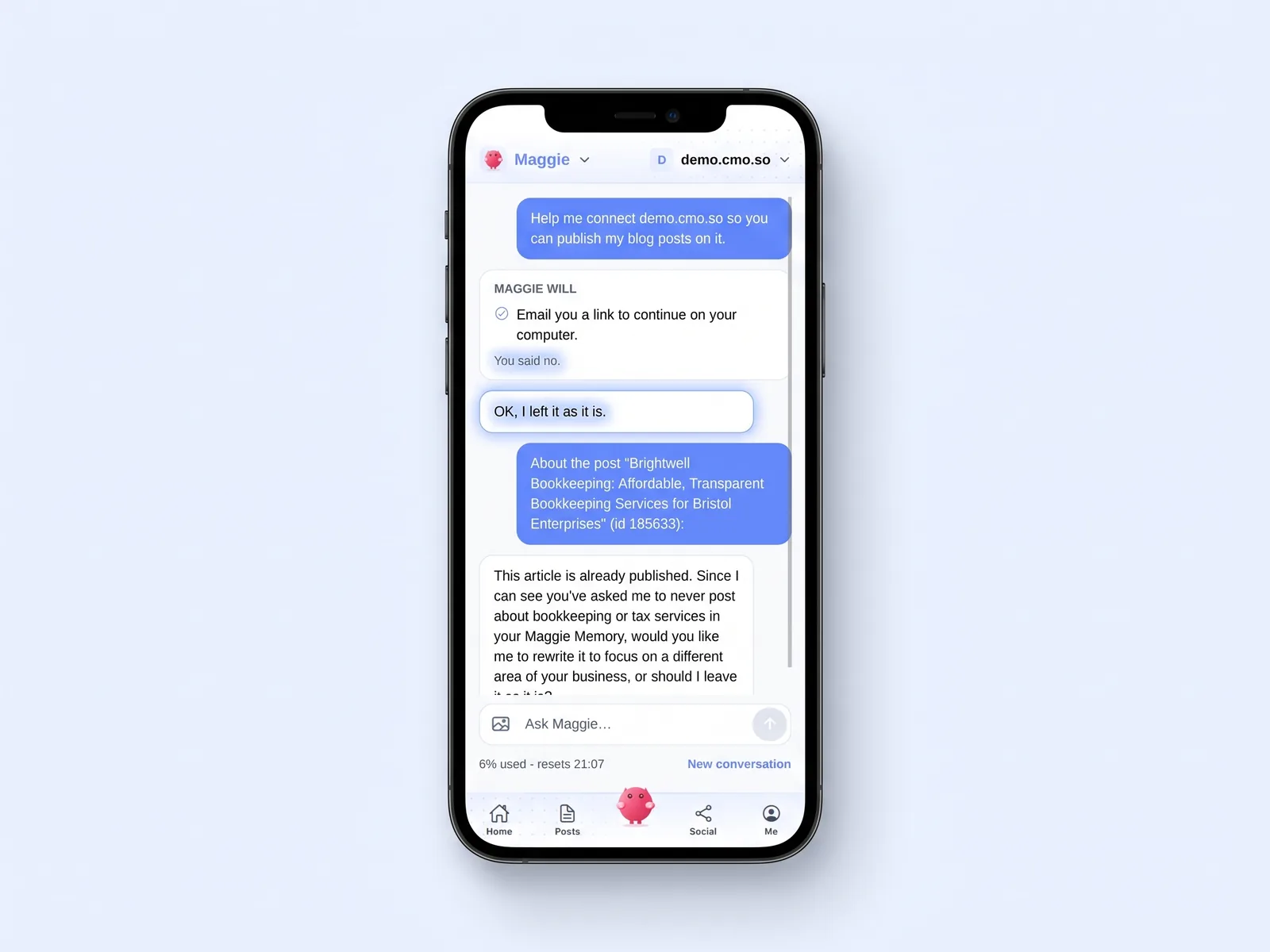
Yes makes the change. No means nothing happens, and she tells you so: here the answer was no, and she left it as it was.
She learns from it
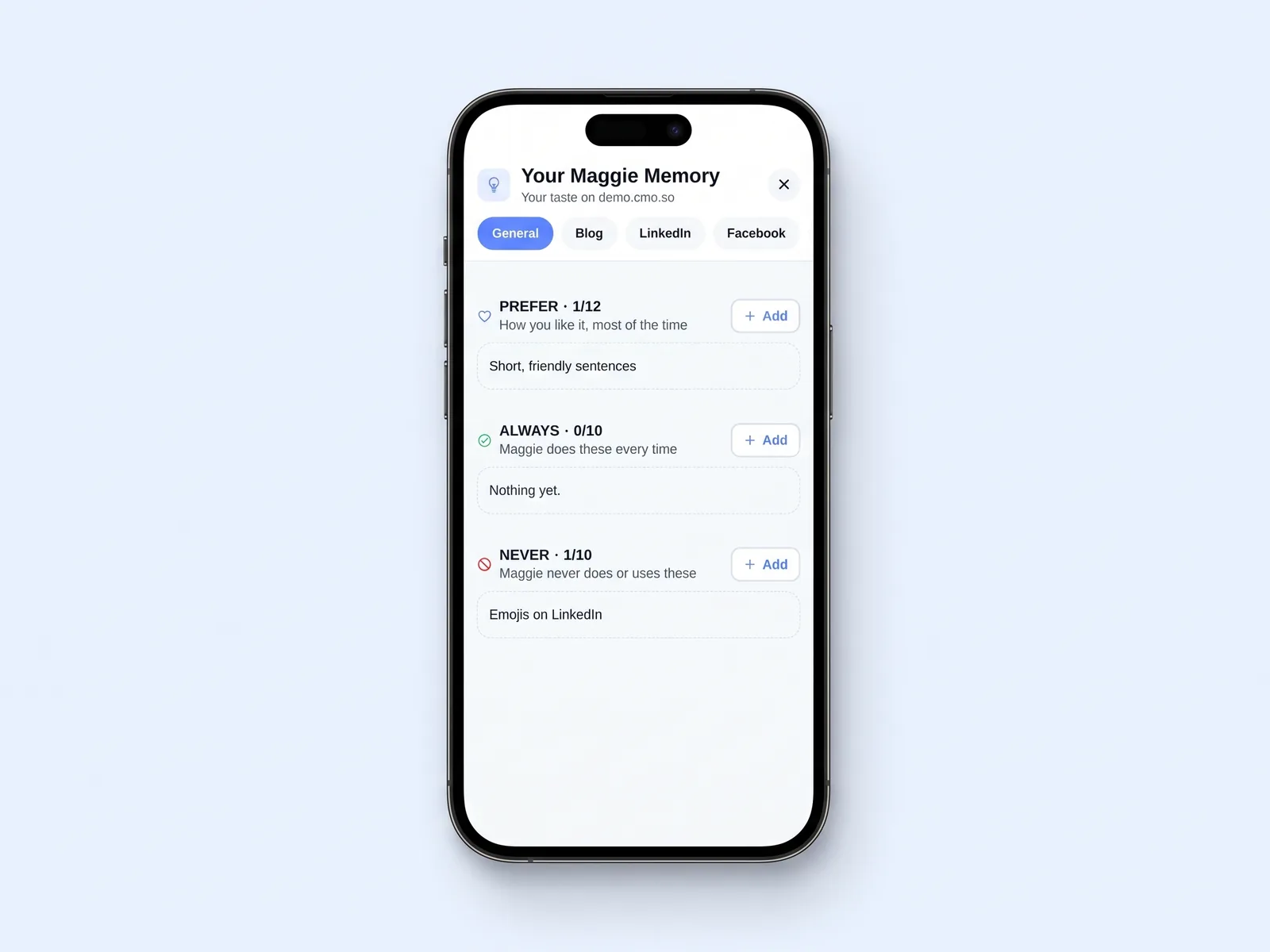
What you accept, decline and edit shapes her next drafts. Your Maggie Memory, under Me, shows what she has learned for each channel, and you can add or remove anything. The entries shown are examples.

A Monday with Ask Maggie
You open the Maggie tab and she starts with what is waiting: two LinkedIn drafts and an article ready to approve.
You ask how last month went. She reads Search Console and AI visibility, says which articles are being found, and suggests two things to write next.
You say yes to the first. A card shows the new idea and that it uses one AI generation. You tap Yes, and Maggie adds it to your plan.
Ask Maggie at a glance
- Where
- The cmo.so app (web and iPhone beta), the ai.cmo.so dashboard, ChatGPT, Claude, Cursor, VS Code and the terminal
- Reads
- Your inbox, posts, ideas, social queue, Search Console, AI visibility, reports and plan
- Changes
- Always shown on a card first, with any cost; nothing happens until you say yes
- Never does
- Sees passwords or keys, pays or cancels plans, creates or revokes API keys, deletes for good
- Memory
- Maggie Memory, per person, website and channel; manage it under Me, Your Maggie Memory
- Daily messages
- Free 15, Air 60, Pro 150, Max 300, Ultra 600, Elite 1,000
- How the limit works
- Per person per day across all your websites, set by the best plan among them
Things to know about Ask Maggie
Messages are a daily allowance
Each message you send counts towards your daily limit. The app shows how many are left.
Writing can use generations
Writing a post or new ideas can use a credit or an AI generation. The card says so before you agree.
She only does what you can
Maggie works with your own access. If you can only view a website, she can only read it too.
Check what matters
Maggie's suggestions are grounded in your data, but she can be wrong. Check facts and numbers before a post goes out.
Cut the £5,900/mo marketing bill to £15/mo
Everything a marketing team does, done by Maggie.
| What needs doing | Without cmo.so | With cmo.so |
|---|---|---|
| Full-time marketing hire | £3,000/mo | Included |
| SEO and AI search (GEO) agency | £1,000/mo | Included |
| Content writer, AI-assisted | £500/mo | Included |
| Social media manager, freelance | £800/mo | Included |
| Designed pictures for every post | £300/mo | Included |
| SEO and GEO softwareRank tracking, site audits, AI visibility | £250/mo | Included |
| AI writing and image tools | £50/mo | Included |
| Working hours | Office hours | 24/7 |
| Total per month | £5,900+ | From £15/mo |
Typical UK costs for a small business in 2026, with AI already cutting freelance rates. Estimates only; your own quotes will vary.
- 5 social posts, 30 once verified
- 15 Maggie messages a day
- Upgrade any time
- 12 posts a day
- 150 Maggie messages a day
- All channels
- 96 posts a day
- 1,000 Maggie messages a day
- All channels
Per website, billed monthly. Blog and social posts share one allowance; your best plan sets how much you can talk to Maggie across all your websites.
Ask Maggie: your questions
Still unsure?
What is Ask Maggie?
Ask Maggie is the chat with Maggie, your AI CMO at cmo.so. You ask in plain words and she plans, writes, fixes and reports on your marketing, using your own brand profile and your own data.
She is not a separate tool to set up. The same Maggie who writes your posts is the one you talk to, with the same memory and the same rules about asking before she changes anything.
What can I ask Maggie?
Anything about your marketing on cmo.so. What needs me today? How did my articles do this month? Write a LinkedIn post about our new service. Make this post shorter. Pause posting while I am on holiday. Help me connect my website.
She can also update your business profile, tidy your ideas, start a series and tell you how much of your plan is left. If something is outside what she can do, she says so and gives you the link.
Will Maggie change things without asking?
No. Looking things up happens straight away, because it changes nothing. Any change, such as approving a post, editing a draft or pausing a channel, first appears on a card that says exactly what will happen.
Changes other people will see, or that are hard to undo, say who will see them. Nothing happens until you tap Yes. If you say no or move on, the change is cancelled and she does not ask again in other words.
Where can I use Ask Maggie?
In the Maggie tab of the cmo.so app, on the web at app.cmo.so and on iPhone in beta, and in the brand editor on the ai.cmo.so dashboard. You can also connect cmo.so to ChatGPT or Claude and ask her there.
Developers can reach her from Cursor, VS Code or the terminal through the cmo.so MCP server and CLI. The memory and approvals are the same in every place, so a rule you teach her in one carries to the rest.
How many messages can I send Maggie?
It depends on your plan: 15 messages a day on the free plan, 60 on Air, 150 on Pro, 300 on Max, 600 on Ultra and 1,000 on Elite. The app shows how many you have left today.
The limit is per person per day, across all your websites, and it comes from the best plan among the websites you have. So if one of your websites is on Pro, you get 150 a day wherever you ask.
Does Maggie use my real data?
Yes. She reads what cmo.so knows about your website: your inbox, posts, ideas, social queue, your plan, and, once connected, Search Console and AI visibility. That is how she can tell you which articles are being found and what to write next.
She only reads what your own access allows, and works from what the tools return rather than guessing. Text that comes from web pages, search terms or AI answers is treated as information, never as instructions to follow.
Does Maggie remember what I like?
Yes, with Maggie Memory. She keeps what you change, what you accept and what you turn down, for each person, website and channel, and turns it into short rules such as prefer shorter LinkedIn posts or never use emojis.
You can tell her directly, for example remember: no emojis on LinkedIn. Rules you add yourself stay until you change them. Manage everything, or switch memory off, under Me, Your Maggie Memory.
Is it safe to connect Maggie to ChatGPT or Claude?
You connect by signing in to cmo.so and allowing access, so no password passes through the chat. Maggie then works with your own permissions, and every change still needs your yes on a preview first.
She never asks for or repeats a password or key. If you paste one by mistake, she tells you so and suggests making a new one. You can review and remove connected apps in your account.
What will Maggie never do?
She never sees or types your website passwords, keys or tokens, and never reads the ones you saved. She does not pay for, change or cancel plans, create or revoke API keys, disconnect your LinkedIn, remove teammates or delete anything for good.
For the things you can do yourself, she gives you the link, or emails it so you can finish on a computer. Me, How Maggie works in the app lists exactly what she can and cannot do.
Does my team share one Maggie?
Teammates on the same website work with the same business profile and posts, each within the access you gave them. If someone can only view a website, Maggie can only read it for them too.
Some things stay personal. Each person's LinkedIn, brand voices and Maggie Memory are their own, and Maggie will not show one teammate's to another, even when they share the same website and the same plan.
Can Maggie help me set up my website?
Yes. Ask her to help you connect your website and she works out your platform, says what to prepare and opens the right connect form in the app. Your details go in the form, straight to cmo.so; Maggie never sees them.
She can also tell you what is still missing, such as verifying your website or finishing a channel's setup, and point you to the single next step, so setting up never turns into a long checklist.
Can I trust everything Maggie says?
Maggie bases her answers on your own data and your brand profile, and quotes tool results as they come back. Even so, she is an AI and can get things wrong, so check facts, numbers and claims before a post goes out.
She will not invent results, reviews or quotes, and she does not promise rankings, traffic or how AI tools will answer. Her suggestions are ideas grounded in what your data shows.
The rest of the toolkit
Ask Maggie works on top of the cmo.so app and reads AI visibility, on the same account.


Ask Maggie about your own website
Open the cmo.so app and ask her anything about your website, or get the iPhone beta on TestFlight.
- Free plan, no card needed
- You approve every post
- Cancel any time